[WORK IN PROGRESS]
Discord Alerts
Receive real-time Discord notifications for your Old School RuneScape achievements and events.
Setting Up Discord Alerts
You can add Discord webhook URLs for each of your OSRS Accounts to automatically forward event notifications to your Discord server. These notifications can be configured to only send when your specific conditions are met.
Configuring Discord Alerts
Each OSRS account can have its own set of alerts configured.
Below is an example of the Discord Alert Settings Dialog.
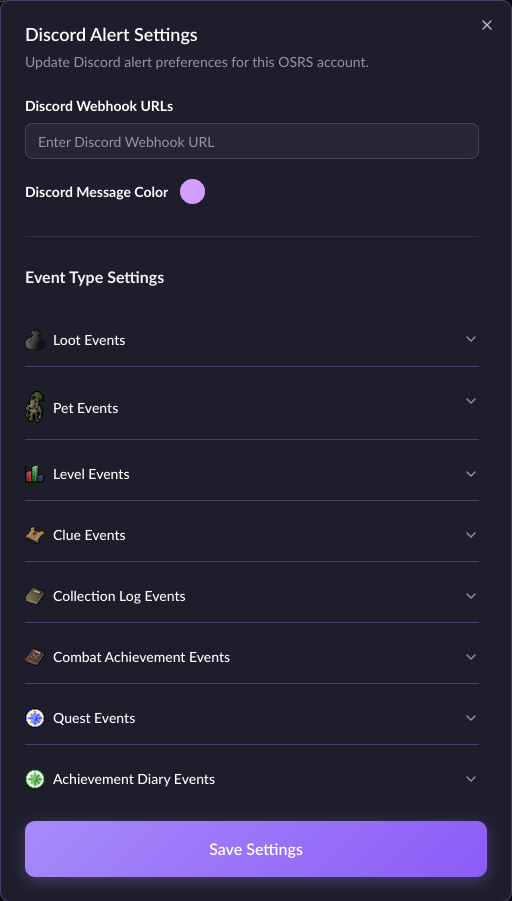
Adding a Discord Webhook URL
- Navigate to the Settings page
- Click the OSRS Accounts tab
- Click the Alerts button for the account you want to add a webhook URL for
- Enter the Discord webhook URL at the top and click the Save Settings button
Notification Types
You can configure alerts for:
- Rare Drops - Get notified when you receive rare loot
- Level Ups - Celebrate skill level achievements
- Collection Log - New collection log entries
- Pets - Never miss a pet drop
- Clue Scrolls - Clue completion rewards
- Quest Completion - Quest milestones
- Combat Achievements - PvM accomplishments
Customization
Configure notification settings to control:
- Which events trigger notifications
- Minimum value thresholds for loot notifications
- Channel routing for different event types